
Validating the work of others is important. I was creative in doing just that.

 OpenStreetMap
Validating the work of others is important. I was creative in doing just that.
completed survey of all speed limits in an area south of Palatine Road, east of Wilke, west of Arlington Heights Road and north of Euclid/Northwest Highway. Updated street data on the map.
 Dr. Raquel Dezidério Souto leading Session 3 of the Ciclo de Oficinas OSM 2026. The files used in Workshop 3 can be found in the video description. Link
This is a very simple idea: given a set of GPX traces for a hike you are planning to take, generate a file containing all the waypoints of interest within the area covered by the GPX traces. I create a buffer around the GPX traces and extract the area from OSM. I define a set of tags of interest. I use Ollama with Mistral Nemo to make sure that POIs make sense to visit while walking on foot, as places are sometimes mislabeled in OSM. Before saving the waypoints to a GPX file, I use Ollama again to generate waypoint descriptions and set labels for each waypoint. Feel free to try it out! The code is on GitHub.
Mapping Sitka is pretty much my identity. I was upset when someone reverted my work because honestly I’ve been working every waking hour for a few months now. It was good though because I needed to step back and not take it too seriously. I’ve had some manic episodes late in life and they unlocked some anger I’m not familiar with. It was actually impressive how mad I got. Anyway, what are these diaries for if not a super personal post? Stay mappy people
Earlier today I had to check an alarm on the servers. The alarm was for a non-issue, but I happened to notice a momentary delay to replication across multiple services and I wanted to investigate.
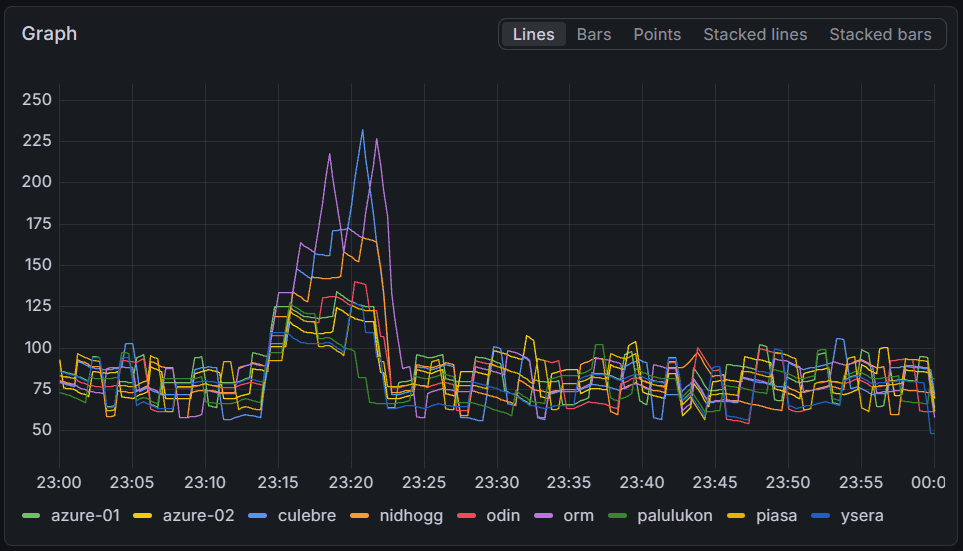
The rendering servers fell up to four minutes behind on some servers, with all servers falling at least a minute behind normal. Interestingly, there does not seem to be a correlation between the delay and the server capacity.
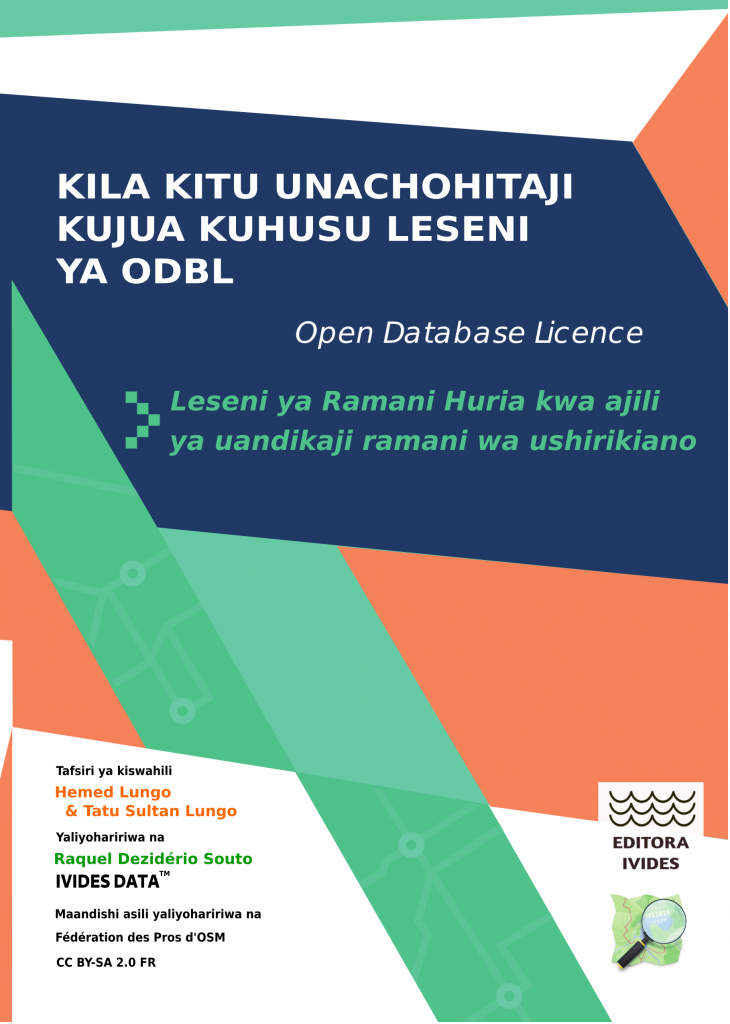
The original work Tout savoir sur la license ODbL : la licence d’OpenStreetMap pour cartographier en commun was written in French in 2024 and updated in 2026 by the Fédération des Pros d’OSM, a French organization that brings together various companies and professionals working with open data, OpenStreetMap, and related software. The authors of the original booklet are: François Lacombe (Datactivist), Florian Lainez (Jungle Bus), Antoine Riche (Carto’Cité) and Christophe Biez (Latitude-Cartagène Cartographies).
The translation to Swahili was done by Hemed Lungo and Tatu Sultan Lungo, from Tanzania, and the booklet was edited by Raquel Dezidério Souto (Editora IVIDES).
The work is licensed under the Creative Commons Attribution-ShareAlike 2.0 France (CC BY-SA 2.0 FR). Text of the license
I’ve been reflecting on the balance between mapping for ‘volume’ and mapping for ‘precision.’ While I understand the value of quick, large-area edits for global visibility, I find it a bit puzzling when polygons are generalized to the point of overlapping everything in sight—especially when high-resolution imagery is available.
I’ve noticed a trend where edit counts are sometimes treated as the ultimate metric of a mapper’s worth. I reckon we should be careful not to let the pursuit of ‘top contributor’ stats overshadow the primary goal of creating a detailed, accurate map for everyone. For me, a well-traced building or a correctly aligned path is worth far more than a high edit count achieved through imprecise mass-mapping. I’m always keen to learn the best practices, so if there’s a standard way to maintain precision while contributing efficiently, I’m all ears. Cheers.
Waiting for someone to do Portland on OHM. About 90% of the people reading this will go “What is Open Historical Map!?”. It’s sadly never used… I wish it was updated more often…
State of the Map US 2026 Presented by OpenStreetMap US was this weekend in Madison, Wisconsin. As any good breakfast lover, I tried to seek out the best breakfast food in the area of Capitol Square. Here’s my thoughts:
This is a very modern looking coffee shop (think crisp whites and light woods - if Apple had a coffee shop) with a great seating area outside overlooking the Capitol Square and is in a very nice spot to be shaded in the morning to enjoy your coffee or small food item. Only downside to sitting outside is you are very close to the road - but that’s to be expected in a downtown area.
I ordered a plain bagel and cream cheese, and an iced coffee with cream and sugar. Typically where I am this means drip coffee poured over ice, but the barista recommended an Americano… when in Rome I suppose. The coffee was delicious, and the bagel came out with more cream cheese than I think I have ever seen on a bagel (not complaining! Just surprising!)
Cost: $9.23 Rating: 7/10
Such a cute spot! I was searching this day for a good omelette and this place seemed highly recommended. The feel was much more artsy coffeehouse vibe, plenty of lighting and a small outdoor seating area, but I ate inside. I was greeted and handed a menu at the door, ordered at the counter, and was recommended the pancakes as well as the omelette if I was hungry enough. Very friendly staff throughout even during what was clearly an elevated breakfast rush with the farmers market getting started just outside!
Hi again!
In my previous diary entry I introduced myself and my GSoC project with Valhalla, and I mentioned we were still putting the finishing touches on the exact main goal. Now we have it! We’re focusing on area routing. This is basically means making the router cross open pedestrian areas (like squares) instead of walking around them and generating weird and inefficient routes. This diary entry is a deep dive into the research I’ve done while exploring the different options.
When you ask a router to go across a square, you would expect it to cross it like any person would. But a lot of routers don’t do that, they may send you around the perimeter or go along the streets surrounding the square. The problem here is that the open area has no “ways” inside of it to travel on.
Let’s see one example (using Valhalla) on Plaza Santo Domingo in Murcia (my hometown!):

Please help me raise funds to purchase the missing sheets from the complete historical 1:50,000 topographic map series of Zimbabwe, formerly Rhodesia.
Donate and more information at https://www.gofundme.com/f/purchase-historical-zimbabwe-topographic-maps
In the unlikely event that any funds remain after purchasing the Zimbabwe map sheets, they will be used to buy missing sheets from the Lesotho or Malawi 1:50,000 topographic map series, which are planned as future projects.
If you use the amazing better-osm-org browser extension/userscript to review changesets, you are probably familiar with its default red, green, and yellow diff highlighting.
While the default colors are great, sometimes you want a custom color scheme that feels more comfortable for your eyes during long validation sessions. For instance, changing the added tags to a cool cyan, keeping deleted tags red, and making modified tags a soft cream/yellow.
Since the script dynamically manages light/dark themes, the easiest way to override these colors globally without messing up the extension’s code is by using custom CSS via the Stylus extension.
/* 1. MODIFIED TAGS -> SOFT CREAM / YELLOW */
    tr.quick-look-modified-tag th,
    tr.quick-look-modified-tag td {
        background: rgba(255, 235, 150, 0.7) !important;
        color: #000000 !important;
    }

/* 2. DELETED TAGS -> RED */
    tr.quick-look-deleted-tag th,
    tr.quick-look-deleted-tag td {
        background: rgba(238, 51, 9, 0.6) !important;
        color: #000000 !important;
    }

/* 3. NEW TAGS -> CYAN */
    tr.quick-look-new-tag th,
    tr.quick-look-new-tag td,
    tr.quick-look-added-tag th,
    tr.quick-look-added-tag td {
        background: rgba(0, 200, 220, 0.6) !important;
        color: #000000 !important;
    }
As I had mentioned in my last post where I explain what they are, I had long planned to make a video about mapping historic lifting stones. It took a while to get to sites and some footage etc and to figure out how to map them best, at least in my opinion, but the video is now online on Youtube. I’ve added subtitles in English, German, Irish, Basque, Finnish, Icelandic and Welsh, because these are to my knowledge the countries where the tradition is still upheld or has been revived. For everything but German, I used the auto-translate function, but YouTube tends to not know the correct word for “lifting stone” in the respective languages, so if anyone can correct me on the subtitles, I’d be grateful. For the same reason, I did not translate the title of the videos into most of these languages, and also because I didn’t want to give the impression that it was completely available in these languages. It is possible now, I think, to have the audio generated in other languages, but that is too creepy to me. As curious as I am to hear myself speak fluent Welsh, I’ll give it a pass.
I’m hoping to do another shorter video about mapping them using OSMAnd, but I need to get to a site of an unmapped stone first which is easier said than done, considering I don’t drive and there are not that many unmapped ones near me. The sites in the current video were accessible by public transport, walking and cycling, so it’s a very sustainable video in its production.
I’ve also done a bit more work on the English wiki page for historic=lifting_stone, translated it into German and written a wiki page for leisure=lifting_stone. The latter is for the newly placed stones and the historic ones that are being lifted again.
I would appreciate if people capable of the above languages could translate the wiki pages into those languages to get a wider coverage of them being mapped.
Lire en français – Leia em português – PDF download in English
[www.mapaedifi.eu] provides lists of buildings with “architect=*” tags, for several European countries : Austria, Belgium, Bulgaria, Czech Republic, Croatia, Denmark, Estonia, Finland, France, Hungary, Iceland, Latvia, Lithuania, The Netherlands, Portugal, Slovakia and Switzerland.
Data from Wikidata and Panoramax is added.
I’ve been working recently on a personal project to investigate how much of the Overpass query language could be implemented using a different back end database, namely the QLever database.
Overpass is the most widely used public interface for querying OSM data. It is relatively easy to use and understand and its outputs in GeoJSON or OSM XML are readily integrated into OSM or other geospatial tool chains for visualization or other processing.
But Overpass is somewhat of a victim of its success. Demand for the public Overpass service has recently outpaced server capacity. My earlier work on a container image for Overpass was intended to help scale capacity by making it easier for data consumers to run their own local Overpass servers.
This project looks in a different direction. What if the Overpass QL with its ease of use and its integration into other tools were available on top of a different data source?
QLever is a SPARQL database developed by the Chair for Algorithms and Data Structures at the University of Freiburg. SPARQL is an RDF query language where the data are represented as “triples” of a subject, predicate, and object.
QLever represents geospatial data as WKT and can perform geospatial operations on WKT. The osm2rdf conversion generates WKT data for every OSM element. So, the data in QLever stores the complete geometry from OSM.
But the key to QLever’s performance with OSM data is that in the conversion from OSM PBF to TTL (Terse RDF Triple Language), osm2rdf generates triples for every element to describe their spatial relations with other elements. That is, osm2rdf pre-computes the spatial relations sfIntersects, sfContains, sfCovers, sfTouches, sfCrosses, sfOverlaps, and sfEquals between all OSM elements.
This is a personal note so I remember the settings to use depending on my method of transportation:
Remember to point one camera to the right, the other to the left. Maximizes aerodynamics and captures better quality images of signs.
ISO above 200 causes picture clarity problems. Remaining under 200 ensures that daylight photos are clearer and signs can be read better. Leaving the Color Profile Flat preserves maximum detail in shadows. None of the images might be appealing to the eye, but they will be very good for mapping purposes
Hi folks! I’m up for election to HOT’s voting membership this year (thank you, Pete!). As a part of that process, I’m posting my answers to their prompting questions here on my OSM diary.
I know that I already owe this community a summary of my previous research within the OpenStreetMap ecosystem – and what’s changed since then. By way of explanation and apology: I wanted to flag that I will be giving a talk at this year’s State of the Map in Paris with an update on my previous work. You can see the talk I gave in 2022 here. I also gave a talk at the HOT Summit in 2021.
I also want to flag that no LLMs were used in the writing of these answers: while I do use them sometimes for more functional, repetitive, or iterative work, I did not use them below. Writing is often a form of thinking for me, and for these answers, I wanted to prioritize that process.
In the last 6 or so years, HOT has both professionally and personally changed how I think about technology, community, and crises. It’s also meant different things at different times for me – which I wrote a bit more about in the question below.
In short: I’ve come to see HOT (and humanitarian mapping more broadly) as a kind of canary in the coal mine for the broader technology ecosystem at large. The questions I found here, at HOT and across OSM are ones that I have later found in the broader ecosystems they feed into (and even the world at large): questions about navigating permacrises, about AI, about shifts in funding landscapes, about ethical dilemmas for data pipelines, about cross-cultural community-building, and many, many others.
I have perhaps an unusual path to being involved with HOT: I was an anthropologist and ethnographer of the ecosystem of humanitarian mapping that HOT feeds into before becoming involved as a mapper and facilitator in the past few years.
Adding Wikidata tags to all OSM features listed in Wikidata


.jpg)


