 OpenStreetMap

This afternoon, I noticed that several of my colleagues were visiting a recently opened school in the far south.
They took several photos, which is quite a rarity on the internet, since not many people actually go there and upload pictures of the newly built buildings.
I wanted to upload those photos, hoping they might be useful for anyone trying to find information about the place.
Then I remembered that OpenStreetMap has this image=* tag.
I could associate an image with the place by adding an image URL there. So I opened Vespucci on my Android phone and added the image URL to the object.
Now I’m back at my PC, and I wanted to make a simple app (or maybe just a script) to browse every image=* tag that exists in OpenStreetMap.
At first, I thought of doing it the usual way : build a Leaflet web map, query the Overpass API, then display the images in popups.
But then I remembered that the Overpass API has recently been under heavy load.
From what I’ve heard, it’s because of a barrage of AI scrapers… or maybe just a flood of quick-and-dirty, vibe-coded OSM apps being produced en masse.
Whatever the exact reason, it has noticeably affected the service.
Knowing that, I was discouraged from making the situation any worse. So I scrapped that idea.
Then I remembered something else:
I don’t know exactly how it works internally, but I assume it uses a different Overpass API endpoint than the ones I would normally query directly.
If that’s the case, perhaps using Ultra wouldn’t add to the current strain on the public Overpass servers.
I also realized that Overpass Ultra’s advanced styling syntax lets me solve the whole problem directly within the query itself, without having to build my own Leaflet-based web app.
So here it is: a quickly put-together Ultra query that displays every OpenStreetMap object containing an image=* tag and shows the referenced image in a simple popup.
---
title: OSM image popup
description: Show only the object name and its image.
popupTemplate: >
  <h2>
    {% if tags.name %}
      {{ tags.name }}
    {% else %}
      {{ type }} {{ id }}
    {% endif %}
  </h2>

  {% if tags.image %}
    <img src="{{ tags.image }}" style="max-width:400px;max-height:300px;">
  {% endif %}
---

[bbox:{{bbox}}];

nwr["image"];

out geom;
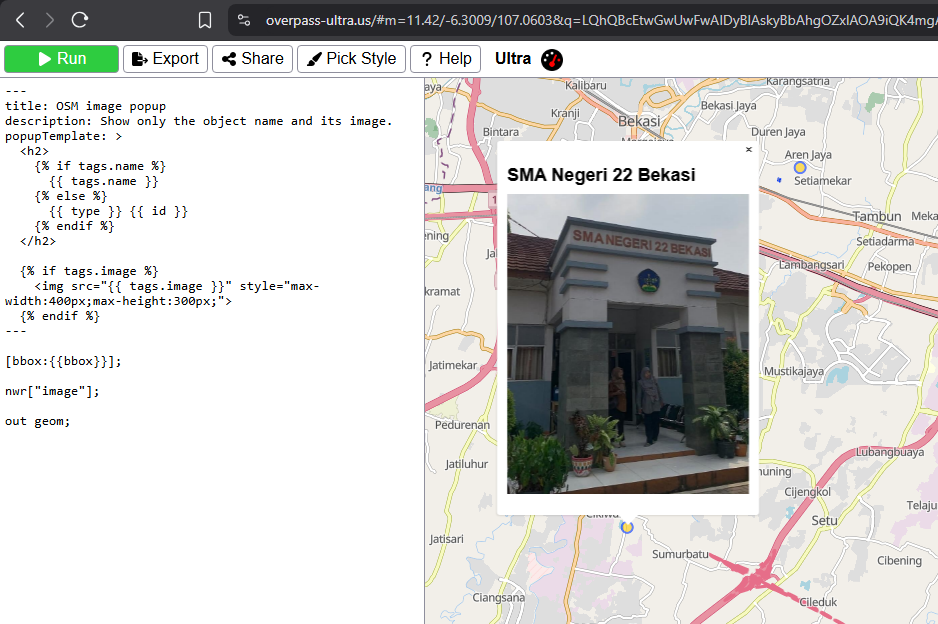
Problem solved. My curiosity is satisfied, and I hope this little project won’t contribute to the worsening of the current Overpass API situation.
Discussion