 OpenStreetMap

Fillet Tools: a small JOSM plugin for rounding corners
Posted by darkonus on 12 May 2026 in English. Last updated on 15 May 2026.I made a small JOSM plugin called Fillet Tools (FilletTools.jar).
It adds an interactive mode for rounding corners of ways, similar to a fillet tool in CAD software. The motivation is simple: in the real-world, many objects are not designed with sharp corners. Roads, sidewalks, residential landuse areas, sports fields, running tracks, and other planned infrastructure often have smooth, consistent curves. Mapping these curves by hand usually means placing several nodes one by one, which is slow and often inconsistent. Fillet Tools is an attempt to make this specific editing task easier in JOSM.
You can find the project in the GitLab repository, and download the test JAR from the v0.1.2 release.
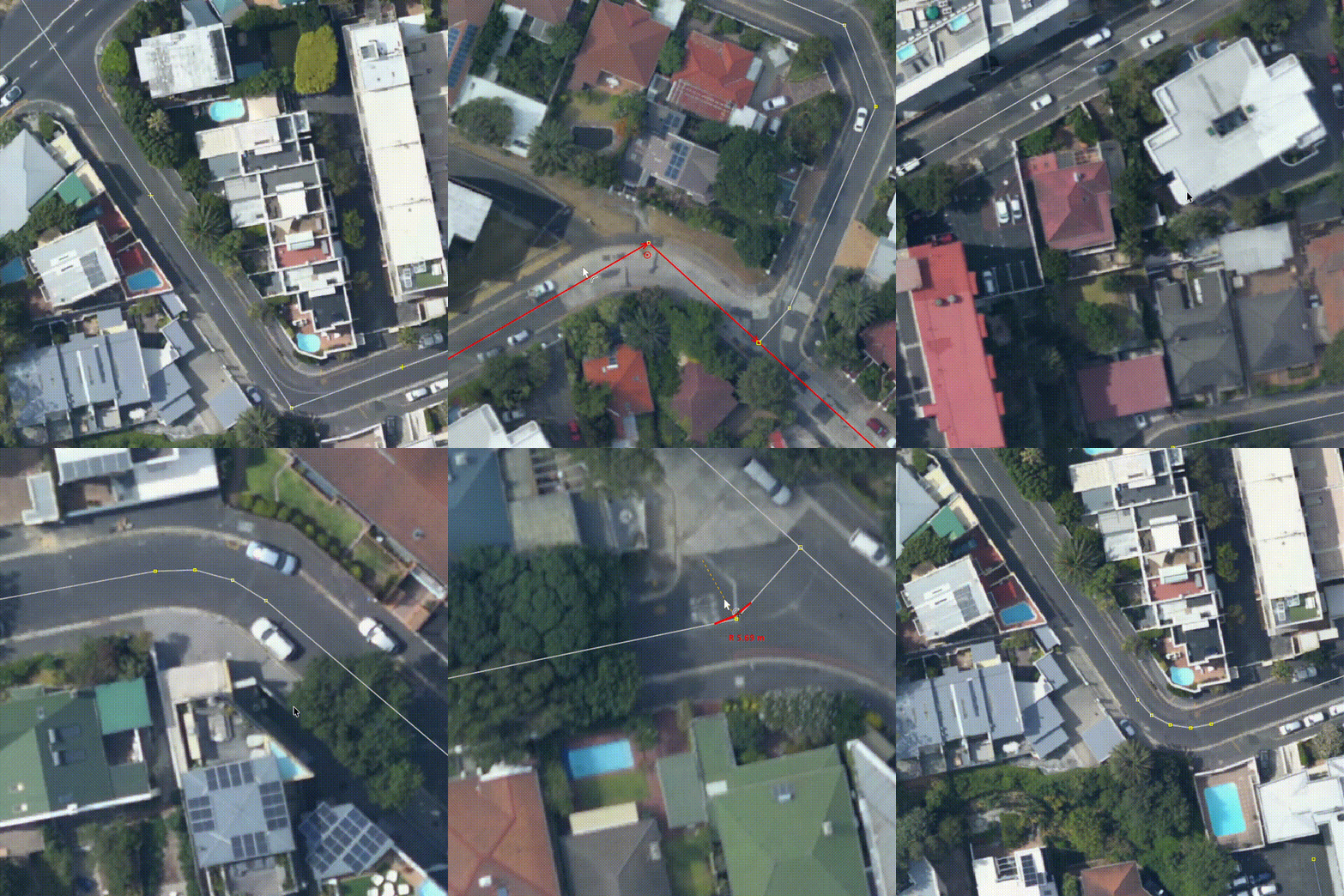
How it works:
- enable the Fillet Tools mode from the toolbar or by pressing v;
- move the mouse over a way or inside a closed polygon;
- small handles appear near available corners;
- drag a handle to preview the radius;
- release the mouse button to apply the rounded corner.
There are also two useful modifier keys:
- Shift snaps the radius to a fixed step, so it is easier to make several corners with the same radius;
- Alt / Option allows a larger “oversize” drag for bigger arcs. The plugin still checks the final geometry before applying the change.
I tried to make the plugin careful with data. It uses the normal JOSM command stack, so undo works as expected. It also tries not to replace important existing nodes. In the usual case, the original corner node is moved onto the new arc instead of being deleted, so its local/OSM id history is preserved as much as possible.
Important note: I am an absolute beginner in programming, and I used an AI coding agent to help write this plugin. So there may be strange, inefficient, or simply wrong things in the code. Please keep this in mind if you look at the repository or test the plugin.
For now the plugin is not available from the JOSM plugin list. To test it, you need to download FilletTools.jar from the release page and copy it manually into your JOSM plugins directory.
After copying the file, open Preferences → Plugins in JOSM, search for Fillet Tools, and enable the checkbox next to it. Then restart JOSM. After restart, the plugin should be ready for testing.
Typical plugin directories are:
On Linux:
~/.local/share/JOSM/plugins/
On macOS:
~/Library/JOSM/plugins/
On Windows:
%APPDATA%/JOSM/plugins/
I would be happy if someone could test it on real mapping tasks.
Feedback, bug reports, strange geometry cases, and suggestions are very welcome. You can write them here in the comments, or on GitLab.
Discussion
Comment from Glassman on 12 May 2026 at 21:09
Very useful plugin. Please note that a lower case v is used to enable the plugin, not an upper case V.
Comment from kwiatek_123 on 12 May 2026 at 22:32
Looks very good!
Comment from darkonus on 13 May 2026 at 03:57
Thanks!
@Glassman, I changed V to v in the text.
Comment from Ethan Grobin on 13 May 2026 at 06:23
This looks really cool, will it be added to the JOSM plugins downloader?
Comment from darkonus on 13 May 2026 at 07:31
@Ethan Grobin, thanks!
If the feedback is neutral or positive, and there are no serious issues such as crashes or damaged data in editing sessions, then I will try to publish it in the official list.
Comment from Ethan Grobin on 14 May 2026 at 10:07
It works amazingly. The place you have to place the jar in on linux is
~/.local/share/JOSM/pluginsComment from darkonus on 14 May 2026 at 13:20
@Ethan Grobin, great to hear that, thanks ❤️
I’ve added the Linux plugin directory path (~/.local/share/JOSM/plugins) to the post.
Comment from martien-176 on 18 May 2026 at 16:14
https://hotosm.slack.com/archives/C35UWSB6Z/p1779120680627479
I posted a message on the HOT slack, inviting mappers to test the plugin.
Thank you for taking the time to create it. I think it will be very useful.
Comment from darkonus on 18 May 2026 at 18:59
@martien-176, thank you for sharing the plugin there and for the positive feedback!
Comment from あじさか on 19 May 2026 at 07:34
This is insanely cool 😄
Drawing curves has become genuinely fun. It feels so satisfying when the rounded corner fits perfectly onto the centerline.
Comment from Paul Berry on 19 May 2026 at 08:51
Started using this yesterday and it’s proving very useful and genuinely enjoyable for making flowing curves, especially in rural areas which tend to be roughly mapped. It’s not just for roads either.
I know it’s in beta but an early observation is that it will only work on angles on a single way. It won’t work at a junction or where one way joins another, such as where a road changes name. Perhaps consider that as a feature request though it will complicate things because more than one way would be moved in these scenarios.
Thanks for creating this!
Comment from darkonus on 19 May 2026 at 11:47
@あじさか, thank you! I feel the same way 😊
@Paul Berry, thanks for the feedback and for testing it. For now I decided to keep the plugin limited to simpler cases with single ways and untagged nodes only. But I’ll definitely add your suggestion as an issue and promise to think about possible approaches for handling connected ways.